
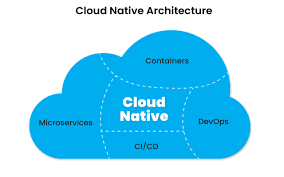
Cloud-native application development builds and runs applications using cloud computing principles. It focuses on making apps scalable, resilient, and easy to update. This approach uses technologies like containers and microservices to achieve agility and speed in software delivery.
Understanding Cloud-Native Application Development
So, what exactly is cloud-native application development? Think of it as a new way to build software. It’s not just about using the cloud.
It’s about designing applications from the ground up to take full advantage of cloud services. This means they can be flexible and powerful.
These applications are designed to work best in a cloud environment. They often use services provided by cloud platforms like Amazon Web Services (AWS), Microsoft Azure, or Google Cloud. This helps them grow easily.
It also makes them less likely to fail.
The goal is to create applications that are fast to build. They should also be easy to update and manage. This helps businesses respond quickly to market changes.
It lets them deliver new features to users faster than ever before.
Key Cloud-Native Concepts
- Microservices: Breaking down large apps into small, independent services.
- Containers: Packaging apps and their needs into small units (like Docker).
- DevOps: Merging software development and IT operations for faster releases.
- Continuous Integration/Continuous Delivery (CI/CD): Automating code checks and deployments.
- Orchestration: Managing many containers (like Kubernetes).
These concepts work together. They form the foundation of cloud-native development. Each part plays a vital role.
They help create robust and scalable applications.
My Own Journey into Cloud-Native
I remember my first big project using cloud-native ideas. It was for a small startup. They wanted a new app.
It needed to handle many users. It also had to update without downtime. My team and I were used to older ways.
We built big, single applications.
We decided to try microservices. It felt like building a house with many small bricks instead of one giant stone. Each brick was a small piece of the app.
These bricks could be built and fixed separately. This was a huge change for us. We had to learn new tools and ways of thinking.
There were late nights. We faced confusing errors. One time, a small service failed.
It took us hours to figure out why. It wasn’t the whole app, just one tiny part. But it affected other parts too.
That’s when we really saw the need for good orchestration and monitoring. It was tough, but the result was an app that could grow. It could also be updated quickly.
That was amazing to see.
Why Go Cloud-Native? The Big Picture
There are many reasons why companies choose cloud-native. The main one is speed. Businesses need to move fast.
They need to add new features. They need to fix problems quickly. Cloud-native makes this possible.
Scalability is another big benefit. Imagine your app suddenly gets very popular. Cloud-native apps can grow to handle more users easily.
They can also shrink back down when fewer users are around. This saves money. It also makes sure the app runs well for everyone.
Resilience is also key. Apps built this way are designed to keep running. If one part fails, others can often keep working.
This means less downtime for users. It also means fewer frustrated customers.
Finally, cost efficiency is important. By using cloud services and scaling up and down, you only pay for what you use. This can be much cheaper than owning and managing your own servers.
Benefits at a Glance
- Faster Innovation: Release new features more often.
- Improved Reliability: Apps stay up and running.
- Better Resource Use: Scale up or down as needed.
- Reduced Costs: Pay for what you use in the cloud.
- Easier Maintenance: Update small parts without affecting the whole.
The Core Pillars: Microservices, Containers, and DevOps
Let’s dive a bit deeper into the core ideas. Microservices are like building with LEGOs. Instead of one giant structure, you have many small pieces.
Each piece does one job well. For example, one microservice might handle user logins. Another might handle product orders.
This makes apps easier to build. It also makes them easier to update. If you need to change how logins work, you only touch the login service.
The rest of the app keeps running fine. This is a huge advantage. It means less risk when making changes.
Microservices vs. Monoliths
Monolith: One big application. All parts are connected. Hard to change.
Microservices: Many small, independent apps. Easy to change.
Next up are containers. Think of a container like a shipping container. It holds everything an application needs to run.
This includes the code, settings, and tools. This makes sure the app runs the same way everywhere. It works on your laptop, in a test system, or in the cloud.
Docker is a very popular tool for creating containers. Once an app is in a container, it’s easy to move and run. It’s also easy to make many copies of it.
This is great for scaling.
What’s Inside a Container?
- The application code.
- All the libraries and tools it needs.
- The operating system parts required.
- Configuration settings.
Finally, DevOps. This is a culture and a set of practices. It brings together developers (Dev) and IT operations (Ops).
The goal is to shorten the system development life cycle. It also provides continuous delivery. It means developers and operations teams work closely.
They automate many tasks. This speeds up how apps are built, tested, and released.
CI/CD is a big part of DevOps. Continuous Integration means developers merge their code changes often. These changes are then tested automatically.
Continuous Delivery means that if code passes tests, it’s ready to be released. This automation is key to the speed and reliability of cloud-native apps.
DevOps Practices
- Collaboration: Dev and Ops teams work together.
- Automation: Automate builds, tests, and deployments.
- Monitoring: Track app performance and errors closely.
- Feedback Loops: Get quick input on app performance.
Orchestration: Managing the Chaos
When you have many microservices running in many containers, managing them can be hard. This is where orchestration comes in. Tools like Kubernetes are leaders in this space.
They help automate the deployment. They also help manage and scale containerized applications.
Think of an orchestrator as a conductor of an orchestra. It makes sure all the instruments (containers) play together. It can start new containers when needed.
It can stop them when they are not. It can move them if a server has a problem. It also helps containers find and talk to each other.
Kubernetes has become the standard. It’s used by many cloud providers. It’s a powerful tool.
It makes running complex cloud-native applications much simpler. It handles many of the difficult tasks involved in managing distributed systems.
Kubernetes in Action
- Automatic Deployment: Roll out new app versions easily.
- Self-Healing: Restarts failing containers.
- Scaling: Automatically adds or removes containers.
- Service Discovery: Helps containers find each other.
- Load Balancing: Distributes traffic across containers.
Real-World Cloud-Native Scenarios
Let’s look at how this plays out in real life. Many online services you use every day are built this way. Think about a popular e-commerce site during a holiday sale.
Millions of people are trying to buy things at once.
A cloud-native architecture can handle this. The website might have separate microservices for browsing products, adding to cart, and processing payments. When the sale starts, the “browsing” and “add to cart” services can be scaled up massively.
More containers are started automatically. This handles the huge traffic. The “payment” service might not need to scale as much.
It handles a smaller percentage of the load.
When the sale ends, the extra containers are shut down. The business only pays for the extra capacity for the time they needed it. This is far more efficient than having servers ready for peak load all the time.
Example: E-commerce Site During a Sale
Before Sale: Normal traffic, standard number of containers.
During Sale: Traffic spikes. Orchestrator scales up product browsing and cart services. More containers spin up.
After Sale: Traffic returns to normal. Orchestrator scales down services. Unused containers are removed.
Another example is a streaming service. They need to deliver video content to millions of devices. This requires a robust backend.
Cloud-native principles help them do this. They can use microservices for user authentication, content delivery, and recommendation engines.
Containers ensure the video delivery system is consistent. DevOps practices help them deploy new features for recommendations or improve streaming quality quickly. If a server in one data center has issues, the system can reroute users to another without them noticing.
This ensures a smooth viewing experience.
Designing for the Cloud: Key Principles
Building cloud-native applications isn’t just about using tools. It’s also about adopting certain design principles. These principles help ensure your applications will run well in the cloud.
One key principle is design for failure. In a distributed system, components will fail. Instead of trying to prevent all failures, you design your app to handle them gracefully.
This means if one microservice goes down, the whole application doesn’t crash. It might degrade gracefully. For example, if the recommendation engine fails, users can still browse and buy products.
Another principle is statelessness. Ideally, microservices should not store important data within themselves. Data should be stored externally, like in a database or cache.
This makes it easy to scale services up or down. It also makes them resilient to failures. If a container restarts, it doesn’t lose any critical information.
Application Design Principles
- Design for Failure: Expect and handle failures.
- Stateless Services: Don’t store session data in the service itself.
- Loose Coupling: Services depend on each other as little as possible.
- Automation: Automate everything from testing to deployment.
- Observability: Make it easy to see what’s happening inside the app.
Loose coupling is also very important. This means services should have minimal dependencies on each other. They should communicate through well-defined interfaces, like APIs.
This allows services to be updated or replaced independently. It prevents changes in one service from breaking others.
Finally, observability is crucial. This means having the ability to understand what is happening inside your application. It involves collecting logs, metrics, and traces.
This data helps developers and operators monitor performance. It also helps them troubleshoot problems quickly. When you have many microservices, knowing what’s going on can be challenging without good observability.
What This Means for Your Projects
If you’re starting a new project, consider cloud-native from the beginning. It might seem like more upfront work. However, it can save you a lot of headaches later.
It allows for more flexibility. It makes your applications more robust.
For existing applications, a full move to cloud-native might be a big undertaking. You might start by breaking off small parts. You could containerize them first.
Then, you could move those to a cloud platform. This gradual approach can make the transition smoother.
When is it normal to use cloud-native? If your application needs to scale rapidly. If it needs to be available most of the time.
If you plan to update it very often with new features. These are all strong indicators that cloud-native is a good fit.
When should you worry? If your application has very simple needs. If it has a small, predictable user base.
If your team doesn’t have the skills or resources to adopt new practices. In these cases, a simpler architecture might be better. It’s important to match the architecture to the project’s needs and your team’s capabilities.
When Cloud-Native Shines
Scaling Needs: Handle sudden user growth or traffic spikes.
High Availability: Ensure the application is always accessible.
Agile Development: Release updates and new features quickly.
Modernization: Update legacy systems for better performance.
Quick Tips for Adopting Cloud-Native
If you’re looking to get started, here are some practical tips. First, start small. Don’t try to rewrite your entire system at once.
Pick one part or a new feature. Try building it using cloud-native principles.
Invest in training for your team. Cloud-native involves new tools and ways of working. Your team needs to learn them.
Encourage collaboration between development and operations. This is the heart of DevOps.
Use managed cloud services. Cloud providers offer services for databases, messaging, and more. These services are often designed for cloud-native use.
They can save you time and effort. For example, instead of managing your own database, use a managed cloud database.
Automate everything you can. From code builds to deployments and testing. Automation reduces errors.
It speeds up your release cycles. Set up CI/CD pipelines early.
Getting Started – Practical Steps
- Learn the Basics: Understand microservices, containers, and DevOps.
- Start Small: Pick a non-critical part of your application to experiment with.
- Containerize: Package an application or service into a container.
- Adopt CI/CD: Automate your build and deployment processes.
- Explore Orchestration: Learn about Kubernetes or similar tools.
Finally, focus on monitoring and logging. You need to know what’s happening. Set up tools to track your applications.
This will help you find and fix problems fast. It will also help you understand how your application is performing.
Frequently Asked Questions About Cloud-Native
What is the difference between cloud-native and cloud-hosted?
Cloud-hosted means an application runs on cloud infrastructure. It might still be a traditional application. Cloud-native means the application is specifically designed to take advantage of cloud features.
It uses things like microservices and containers for scalability and agility.
Is cloud-native development more expensive?
Initially, there can be an investment in learning new tools and practices. However, in the long run, cloud-native can be more cost-effective. This is due to efficient resource use (scaling up/down) and reduced downtime.
Do I need to use Kubernetes for cloud-native?
Kubernetes is the most popular container orchestrator for cloud-native apps. It’s highly recommended for managing complex containerized systems. However, other orchestrators exist, and simpler applications might not need one initially.
How does cloud-native affect security?
Security in cloud-native applications is a shared responsibility. Cloud providers secure the infrastructure. You secure your applications and data.
The distributed nature can add complexity, but tools and practices exist to manage security effectively across microservices.
What skills are needed for cloud-native development?
Skills include understanding microservices architecture, containerization (Docker), orchestration (Kubernetes), DevOps practices, and cloud platform services. Programming skills remain essential, often in languages suitable for microservices.
Can I use cloud-native for mobile apps?
Yes, cloud-native principles can be applied to back-end services that power mobile apps. This helps make the mobile app experience more robust and scalable. The app itself might not be “cloud-native,” but its supporting infrastructure can be.
Wrapping Up: The Future of Application Building
Cloud-native application development is more than a trend. It’s a fundamental shift in how we build and run software. It offers speed, flexibility, and resilience.
These are crucial in today’s fast-paced digital world.
By embracing microservices, containers, and DevOps, you can create applications that are ready for the future. They can adapt to changing needs. They can serve users reliably.
It’s an exciting time to be building software.
